


One of the main properties advanced in blockchain technology is interoperability, the art of different blockchains communicating with one another. Interoperability is crucial when it comes to exchanging data and assets such as nonfungible tokens (NFTs) or cryptocurrencies while enjoying the best of two or more platforms to save on fees, for example, or transact faster.
The Avalanche blockchain is an interoperable, versatile platform and cryptocurrency network that addresses scalability, security and decentralization issues with a unique proof-of-stake (PoS) governance type. It was developed by Ava Labs, a New York-based research and development company, to launch decentralized finance (DeFi) and enterprise blockchain applications.
It is powered by its native token, AVAX, and has smart contract functionality that puts it in direct competition with Ethereum. The PoS platform’s smart contracts primarily support decentralized applications (DApps) and autonomous blockchains with fast transaction processing times, a reward structure incentivizing participation, and advanced interoperability.
Avalanche interaction with Ethereum and its DeFi ecosystems is facilitated by the crypto wallet MetaMask, a software that as many as 10 million people use. It can be downloaded as a browser extension on Chrome and Firefox or as an iOS and Android mobile phone app. Before interacting with Ethereum’s blockchain and DApps, users need to add the Avalanche network to their MetaMask wallet, and this guide will show them how to do it.
How to set up MetaMask?
MetaMask is a cryptocurrency wallet that allows users to connect with DApps besides storing Ether (ETH) and ERC-20 tokens. Connecting MetaMask to Avalanche allows AVAX users to enjoy all the DApps Ethereum has to offer without leaving the Avalanche network. The Avalanche interoperability also makes the network more accessible for developers to build on since it shares its smart contract programming language, Solidity, with Ethereum.
It needs to be noted that there are three blockchains on the Avalanche network: the Exchange Chain (X-Chain), the Contract Chain (C-Chain) and the Platform Chain (P-Chain).
The Avalanche X-chain’s primary use is to send and receive AVAX and cannot be employed on Web3 platforms or added to Web3 wallets like MetaMask. The P-Chain is the metadata blockchain on Avalanche that coordinates validators, keeps track of active Subnets — sovereign networks that define their own rules regarding their membership and tokenomics — and enables the creation of new Subnets.
Only the Avalanche default smart contract C-Chain wallet is compatible with MetaMask, an essential piece of information to bear in mind since, if you select the wrong chain when adding Avalanche to MetaMask, you may lose your coins.
Therefore, to transfer AVAX from an Avalanche wallet, a user’s tokens need to be in the C-Chain wallet or use an exchange wallet integrated with C-Chain, such as Binance. If the token does not reside in the C-Chain, it can easily be transferred internally from any of the other two Avalanche blockchains by paying a small transaction fee.
MetaMask can be added as an extension to Chrome, Firefox, Opera, Brave browser and iOS or Android on mobile from the MetaMask website; however, for the purpose of this article, the Chrome extension will be considered.
Users must verify the legitimacy of the MetaMask website to avoid being tricked by scams and compromised web pages. Downloading the right extension from the official website is strictly recommended.
From the MetaMask website, click “Download for Chrome” and “Add to Chrome” to add the extension. Further steps are listed below:
- Install the MetaMask Chrome extension and click “Get Started” on the MetaMask welcome page.
- You can import your existing cryptocurrency wallet, but you’ll need to enter the wallet seed phrase; then click on the “Import wallet” option.
- You can also set up a new wallet by clicking on the “Create a wallet” button. Here, you must create a secure password to access the wallet from your device.
- Essential information about your seed phrase will be displayed on the next page, and you’ll have to pay particular attention to it. The seed phrase, or recovery phrase, is a crucial security feature and backup for your cryptocurrency wallet. It will allow you to access your wallet with your tokens even if you lose or forget your password.
- Next, click on the lock button to view the seed phrase. Take note of the words in the proper order, store them securely offline, and never share them with anyone. Your assets may be at risk if someone compromises your device and gets access to your seed phrase.
- The system will ask you to repeat the seed phrase on the next page; make sure you select the words in the correct order.
- Click “Confirm” to finish and then “All Done” to access your new wallet.
The process described above will connect MetaMask automatically to Ethereum. However, you must complete the steps highlighted below to add the Avalanche network to MetaMask.
How to set up the Avalanche network on MetaMask?
Connecting MetaMask to Avalanche is a rather straightforward process. Once you’ve logged in to the MetaMask wallet, click on the Ethereum mainnet drop-down menu and select Custom RPC, as shown below.
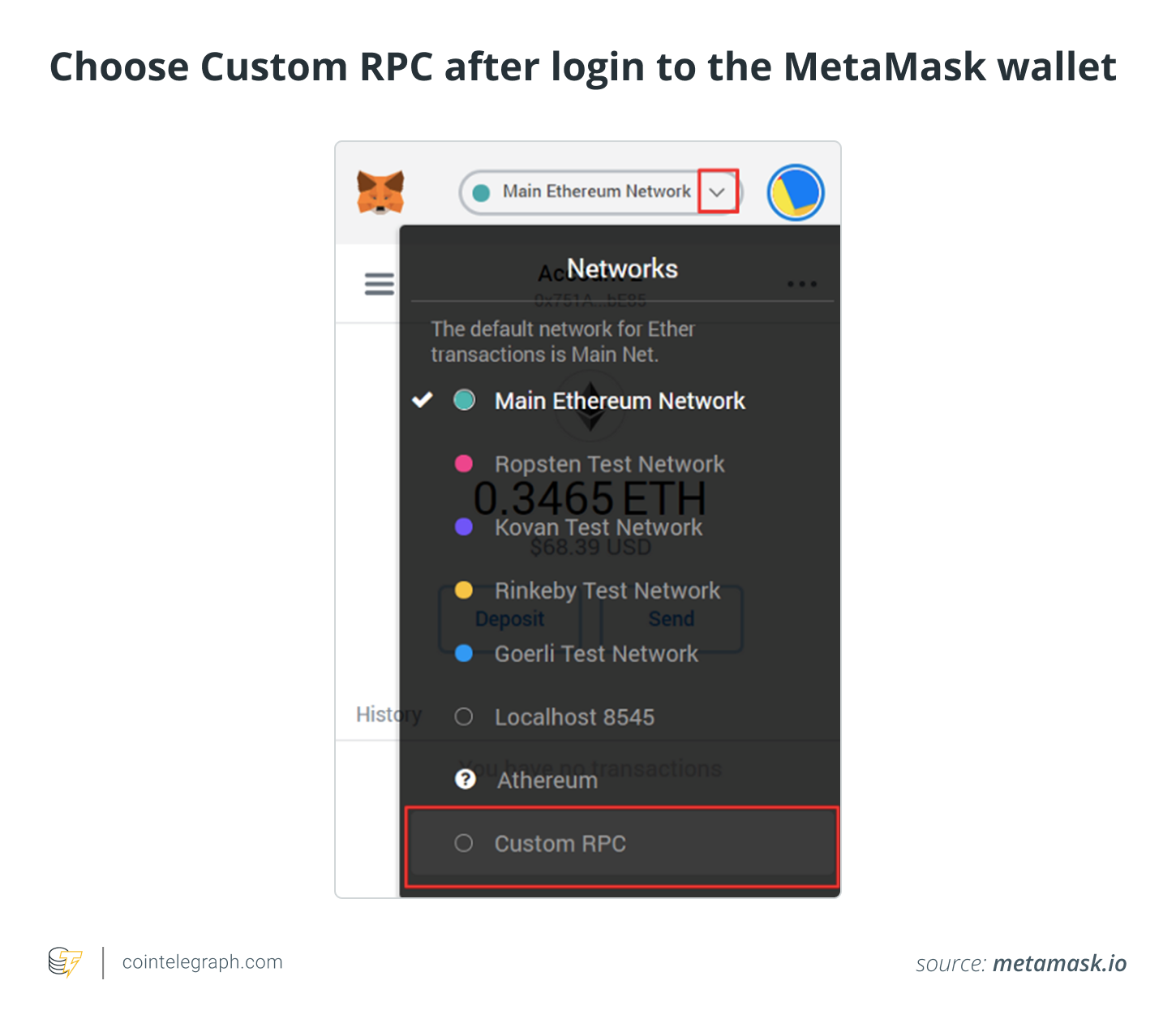
You will be redirected to the “Add a network” page, where you’ll need to add the following information:
You can view the “Add a network” requirements to use MetaMask on Avalanche here:
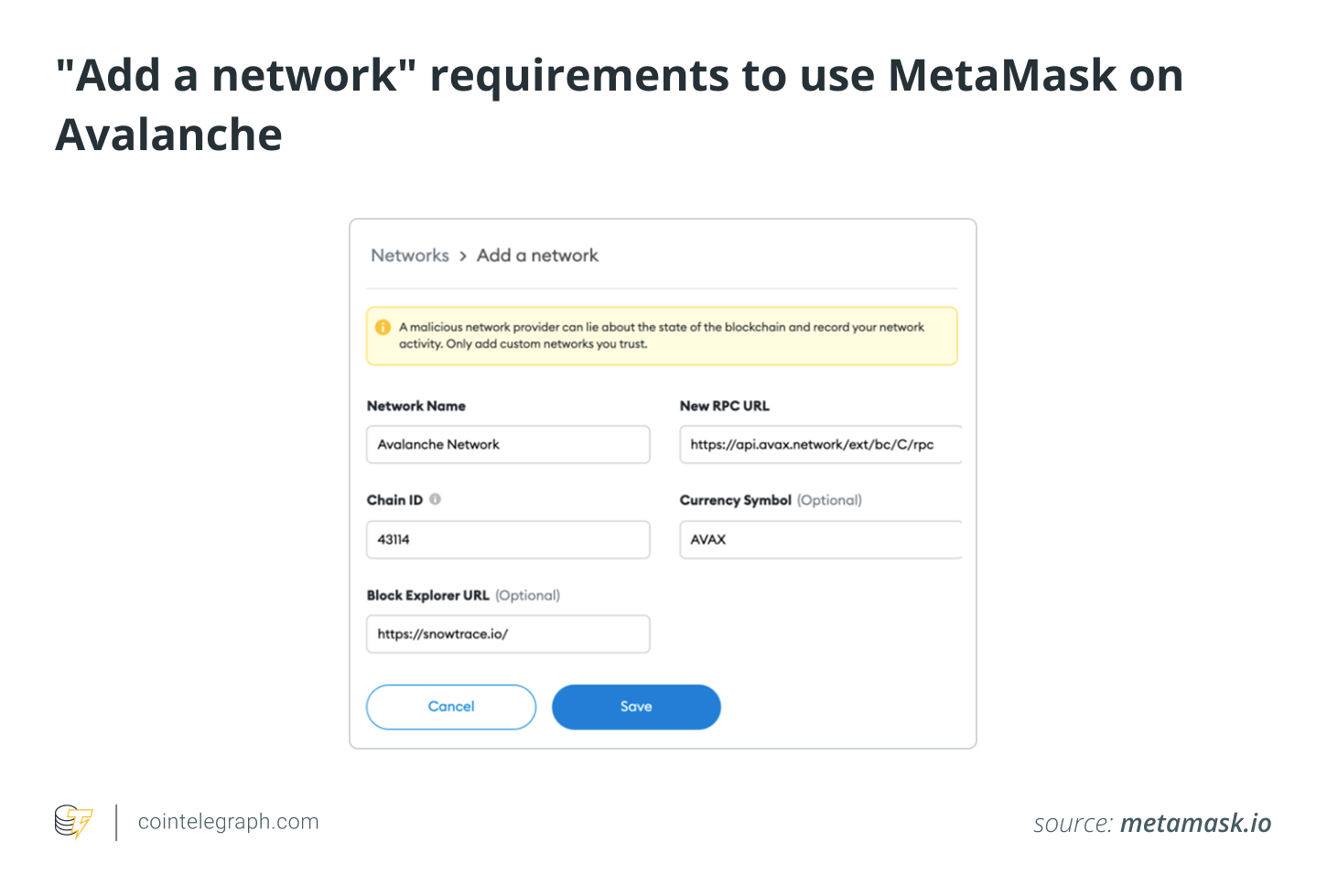
Click on “Save” to complete the process. You’re now ready to use MetaMask on Avalanche and all its DeFi and Web3 applications.
How to send AVAX tokens to MetaMask?
After connecting the Avalanche network to MetaMask, you can send your AVAX coins from an Avalanche wallet to your MetaMask wallet. Remember that only the C-Chain is compatible with MetaMask.
- Log in to your Avalanche wallet and transfer your tokens to the C-Chain blockchain if they reside on the P- or X-Chain blockchains.
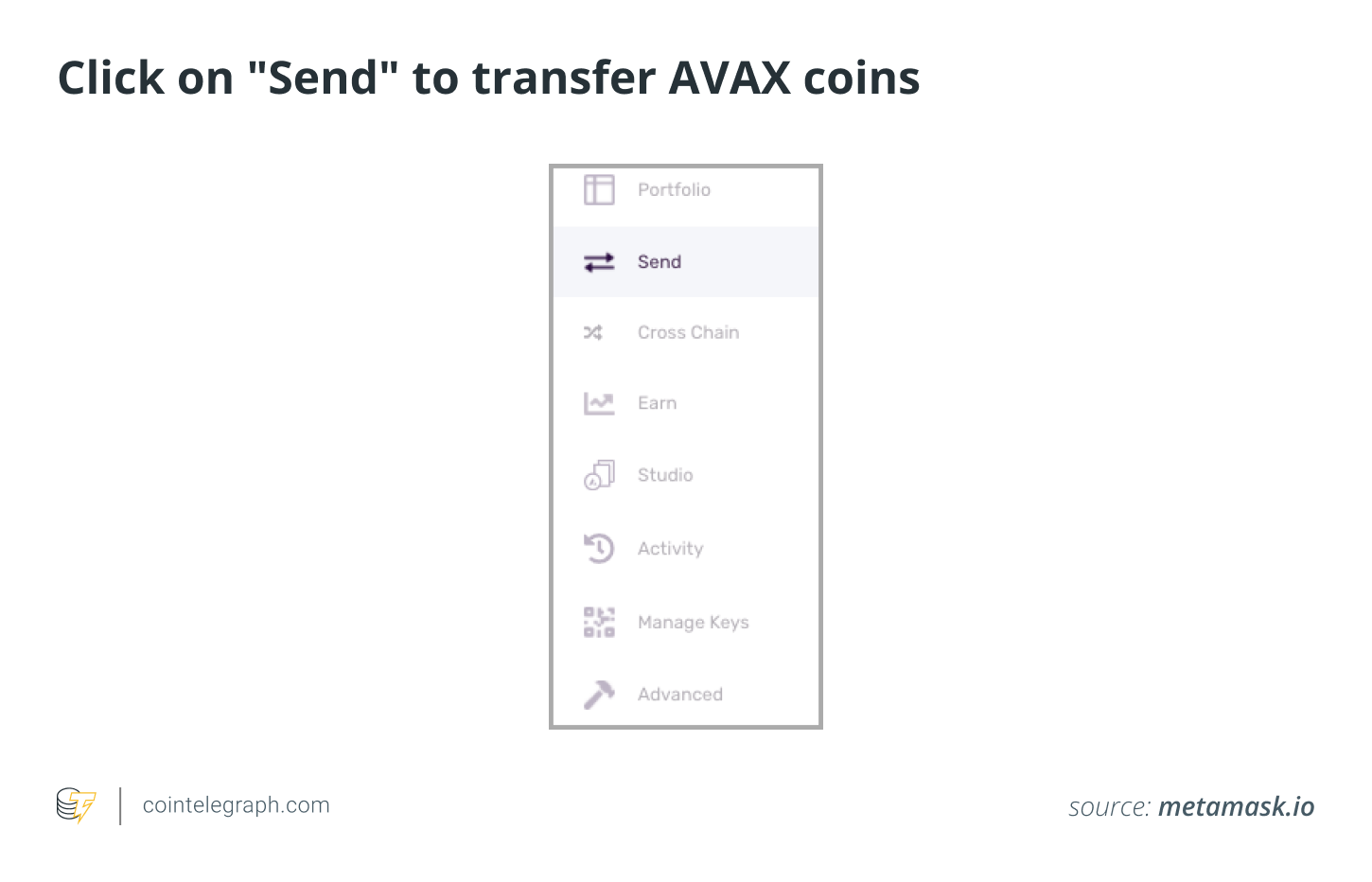
- Simply click “Cross Chain” on the left menu bar and select “C-Chain” as the destination chain.
- Enter the amount you wish to transfer and click “Confirm.” A small transaction fee will be added to the final amount.
- You can now send the AVAX coins to MetaMask by clicking on “Send” from the left menu.
- Select “C Contract” as the source chain and enter the amount you want to send to MetaMask.
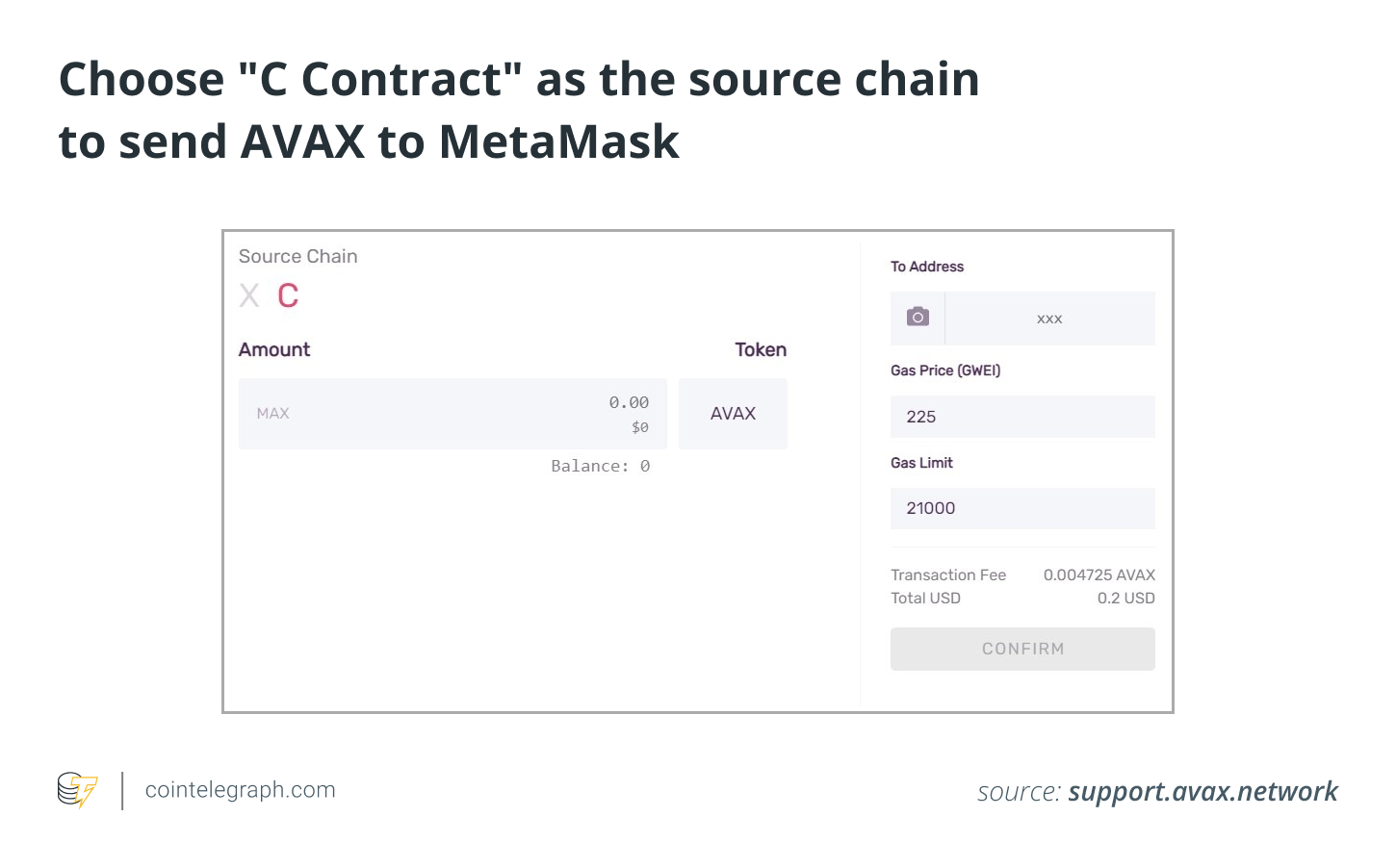
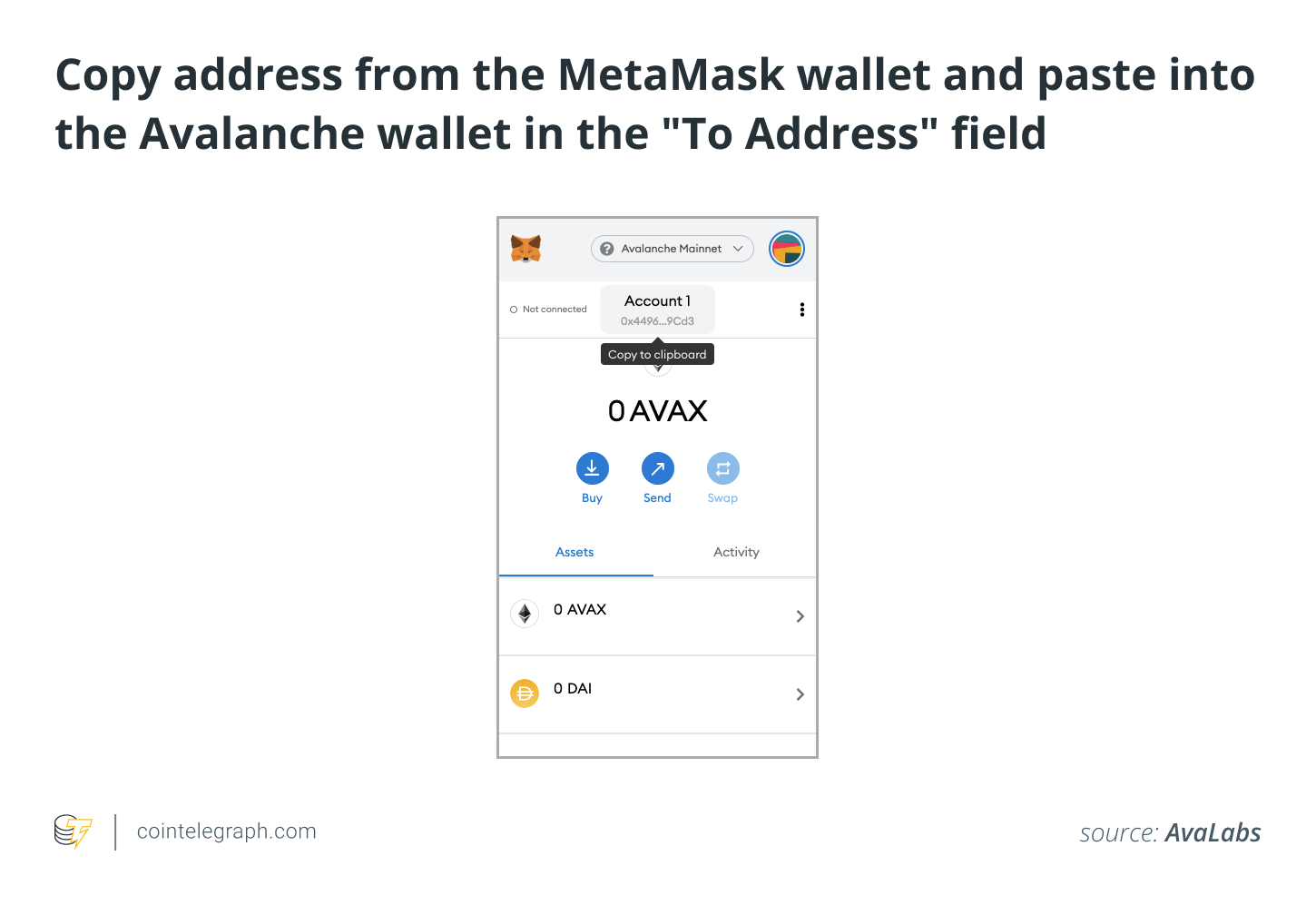
- Now go to your MetaMask wallet and copy the address, which you will paste into the Avalanche wallet in the “To Address” field.
- Check whether you have sufficient gas for the transaction fee.
- Confirm and finalize the transaction.
- Once the transaction is confirmed, you will be able to view the AVAX coins in your MetaMask wallet.
What other wallets are compatible with Avalanche?
MetaMask is surely the versatile DeFi wallet for running smart contracts and DApps; however, AVAX can be transferred, stored, staked and exchanged in other cold and hot wallets. With over 90 million verified users worldwide, the Coinbase wallet is a secure and easy-to-use hot wallet to exchange, earn and store AVAX. Security is enhanced through the software’s two-factor authentication making it a safe wallet to use for both beginners and advanced users.
The Trust Wallet is another hot wallet that supports all DeFi programs, including NFT storage, Web3 capabilities, staking, swaps and purchases. It supports the Avalanche C-Chain in addition to many other blockchains so that DApps could be bridged to AVAX easily. This hot wallet is one of the most utilized among Web3 enthusiasts because of its user-friendly interface and versatility.
Ledger Nano S or X cold wallets both support Avalanche, and users can access and store their AVAX tokens through all Avalanche chain addresses. Cold wallets are recommended over hot wallets, as the private keys to access the cryptocurrency are stored offline in a hardware device, making it difficult for hackers and malicious actors to steal them.